
Excel is usually filed under spreadsheets, yet its formulas and macros can carry software that goes well beyond budgets and pivot tables. From schedulers to games to financial dashboards, these three kinds of programs show how far a workbook can stretch before it needs a separate application.
Project scheduling engines
Excel can calculate schedules, not just draw them
A typical Excel Gantt chart is a table of dates dressed up with colored cells, which means every slipped task forces someone to adjust its successors by hand. A scheduling engine reverses that arrangement, letting the workbook derive dates from the logic that connects tasks. The simple version needs little more than the WORKDAY function. Microsoft’s archived tutorial on building a schedule works out each finish date from a start date and a count of working days, then carries that finish into the next row so the plan shifts whenever an early step changes, with parallel steps simply sharing a start date.
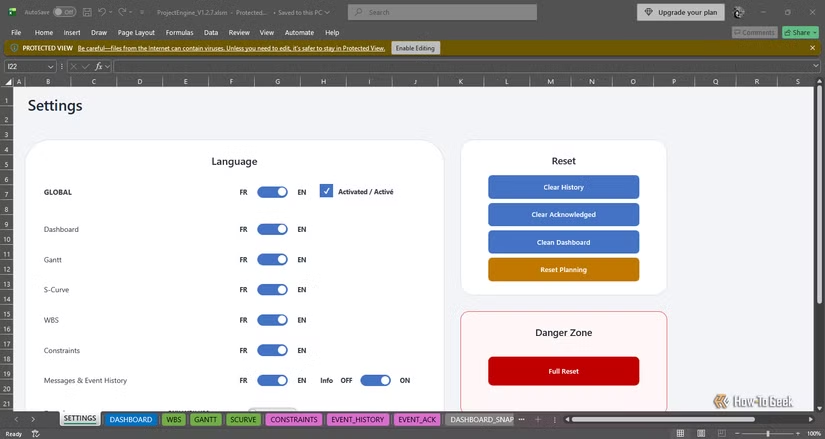
The far end of that spectrum is ProjectEngine, an open-source Excel and VBA project released under the GPL-3.0 license. It handles finish-to-start, start-to-start and finish-to-finish relationships, positive and negative lags, multiple predecessors, and five-day or six-day working calendars. From those inputs, it calculates the critical path, the longest path, and both total and free float, while a diagnostics console sorts problems such as dependency cycles into info, warning, and stop messages. Users can drag a task across the Gantt chart and watch the change ripple through the plan, or build full what-if scenarios and lock in the one that works. The dashboard and S-curve read from the same calculated data, so reports cannot quietly drift away from the schedule.
It comes with honest limits. Its developer says it does not try to replace Microsoft Project or Primavera P6, which cover broader enterprise, resource, and portfolio needs, and it targets teams that must stay inside Excel. It also ships as a macro-enabled .xlsm workbook, so macros have to be allowed to run. Even so, it proves the broader point: with dependency logic, calendars, and a disciplined calculation layer, a spreadsheet can behave like genuine planning software.
Full-featured games
Formulas alone can drive a playable game
Excel already has most of what a simple game needs: a grid that works as a board, cells that store state, formulas that apply rules, and a macro language that responds to input. Size the columns and rows so cells look square, and each one becomes a tile. Fill colors or conditional formatting paint the board. Formulas handle bookkeeping, such as a COUNTIF across a row to check for a win or a SUM to keep score, while a hidden sheet can hold the level and a high-score table that survives when the workbook is saved.
The type of game determines how much VBA is involved. Turn-based games such as Minesweeper, Sudoku, tic-tac-toe, or Battleship map naturally onto worksheet events, because Excel can run a macro when a cell is selected, double-clicked, or changed, and the rules can be checked with formulas or a short routine. Real-time games such as Snake need a game loop, which developers typically build with a timer routine like Application.OnTime, or with a loop that yields control using DoEvents.
Application.OnKey can bind keyboard keys to macros for movement, and RANDBETWEEN or VBA’s Rnd function supplies the randomness for spawning food, shuffling cards, or laying mines.
Performance and polish take the most care. Turning off screen updating while the board redraws prevents flicker, and writing a whole array of values to a range in one step is much faster than updating cells one at a time. There are some trade-offs, though. The workbook must be saved as a macro-enabled .xlsm file, macros must be allowed to run, and Excel for the web does not run VBA macros. A cell-based game will never look like a commercial title, but a working, replayable game with scoring and levels is well within reach, and it makes an unusually good way to learn VBA. All in all, a pretty cool experiment.
Financial trackers
Market data turns a ledger into a dashboard
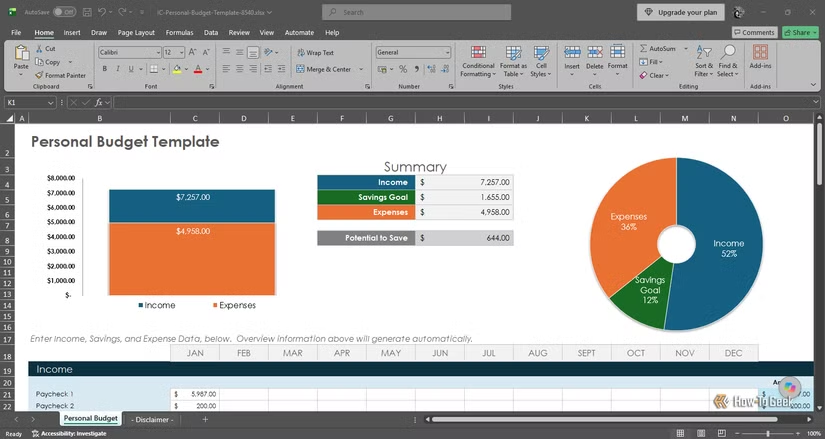
A personal finance tracker is the most approachable program you can build in Excel, and it needs no macros. You can download one — that’s what I did. But even if you didn’t, it’s pretty easy to put one together. The foundation is a transaction log stored as an Excel table, with one row per purchase or payment and columns for date, description, category, and amount. Because tables expand automatically as you add rows, every formula and chart that points to them updates automatically. A drop-down list of categories, created with data validation, keeps entries consistent, which matters because a typo such as “Grocery” instead of “Groceries” would split one spending category into two.
A second sheet turns the log into a budget. List each category with a monthly limit, then use SUMIFS to add up the transactions that match the category and month, and subtract the result from the limit to show what remains. Conditional formatting can turn a row red once spending passes the limit, so problems stand out at a glance. A PivotTable offers a faster route to the same summary, grouping spending by category and month, though it must be refreshed after new entries arrive. Charts on a summary sheet, such as a column chart of monthly spending or a pie chart of category shares, complete the dashboard.
The same workbook can grow in useful directions. You can bring in bank exports in CSV format through Power Query, which can clean and append new statements without retyping. A savings goal is a target amount divided by the months remaining, and the PMT function calculates the regular payment on a loan from its rate, term, and balance, which helps when comparing payoff plans. The limits are practical rather than technical. Data entry takes discipline, category rules need occasional review, and a file containing financial records deserves password protection and backups. Kept simple, it still gives a clear picture of monthly cash flow.
Excel can host real, working software
Schedulers, games, and financial trackers each show Excel doing work usually left to dedicated software. Each has limits in speed, scope, or licensing, but all three run inside a familiar workbook. Anyone curious about the platform’s ceiling can start with any of them and learn quickly.